Cameras
All of the synthetic images in the Limbo Data are rendered using an off-the-shelf CGI pinhole camera model, which is to say that there are no lens distortion, shift-tilt, sensor noise, or depth of field effects. We chose to leave these out deliberately, since they can easily be added to the rendered images by experimenters after the fact.
You can get information about the camera used to render a sample by examining the sample metadata directly. For example, given the following sample:
[1]:
from IPython.display import display
import limbo.data

dataset = limbo.data.Dataset("../data")

sample = dataset[0]

if sample.image:
    display(sample.image)
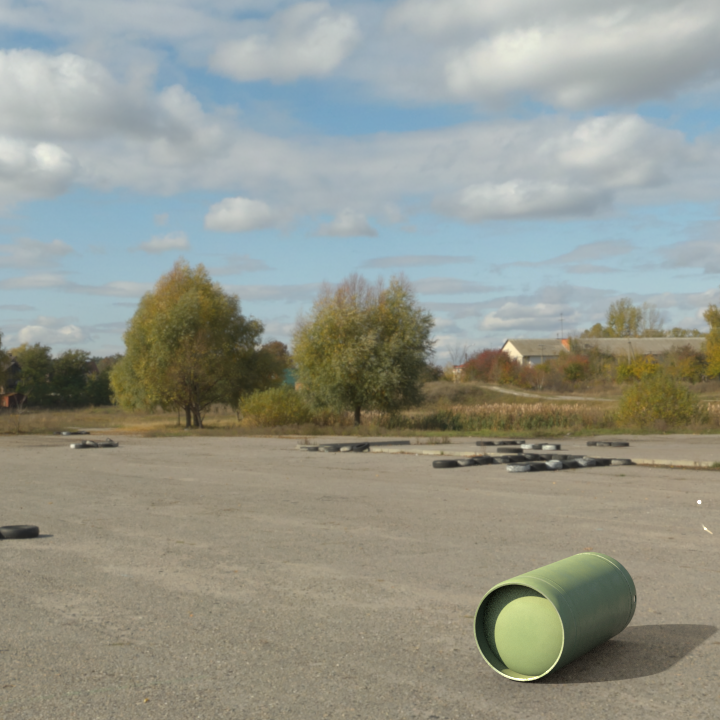
… you can retrieve a set of global “parameters” that were used to generate the sample, including camera information:
[2]:
sample.metadata["synthetic"]["parameters"]
[2]:
{'/background/env_map': 'driving_school_8k',
 '/camera/focal': 66.58746224652447,
 '/camera/orientation': [1.305654357222066,
  -149.80491960728259,
  1.6781659541312035],
 '/camera/position': [-3.428114175796509,
  2.1293375492095947,
  -9.065103530883789],
 '/cylinder/material': 'lightgreen'}
In this example, /camera/position and /camera/orientation describe the camera’s placement in world coordinates, while /camera/focal provides the camera focal length in millimeters. /background/env_map is a categorical description of which environment was used, while /cylinder/material is a categorical description of the cylinder’s “paint job”.
Note
The contents of a sample’s metadata, including its parameters, can change from campaign to campaign. For example, the /cylinder/material property described above is only provided for campaigns that contain individual cylinders.
For the curious, the Redshift render engine used to generate the Limbo data also embeds camera data in the output image, which you can access:
[3]:
sample.synthetic.image.metadata
[3]:
{'capDate': '2021:03:29 10:23:51',
 'channels': {'A': ['HALF', 1, 1],
  'B': ['HALF', 1, 1],
  'G': ['HALF', 1, 1],
  'R': ['HALF', 1, 1],
  'Z': ['FLOAT', 1, 1]},
 'compression': 'ZIPS_COMPRESSION',
 'dataWindow': [0, 0, 719, 719],
 'displayWindow': [0, 0, 719, 719],
 'dwaCompressionLevel': 45.0,
 'lineOrder': 'INCREASING_Y',
 'pixelAspectRatio': 1.0,
 'rs/camera/DOFAspect': 1.0,
 'rs/camera/DOFFocusDistance': 100.0,
 'rs/camera/DOFRadius': 1.0,
 'rs/camera/FStop': 8.0,
 'rs/camera/allowOverexpDesat': 1,
 'rs/camera/allowedOverexp': 0.10000000149011612,
 'rs/camera/aperture': [1.0, 1.0],
 'rs/camera/aspect': 1.0,
 'rs/camera/blackCrushAmount': 0.0,
 'rs/camera/blackCrushThresh': 0.25,
 'rs/camera/cdm2': 10000.0,
 'rs/camera/farPlane': 3690.853515625,
 'rs/camera/fov': 34.55451965332031,
 'rs/camera/iso': 100.0,
 'rs/camera/nearPlane': 0.04848691076040268,
 'rs/camera/saturation': 1.0,
 'rs/camera/shift': [0.0, 0.0],
 'rs/camera/shutterRatio': 100.0,
 'rs/camera/transform': None,
 'rs/camera/vignetting': 1.0,
 'rs/camera/whitepoint': None,
 'rs/hostname': 'S1031328',
 'rs/version': '3.0.41',
 'screenWindowCenter': [0.0, 0.0],
 'screenWindowWidth': 1.0}
Most of these values are the same across all of the data; the values most likely to be of use for experimenters are rs/camera/farPlane, rs/camera/fov, and rs/camera/nearPlane.